

Looking for a fun baby shower game? This Price Is Right-inspired baby shower game made with Cricut is simple to set up and keeps guests laughing.
When I planned my daughter's baby shower for my first grandbaby, I knew I wanted fun baby shower games that would get everyone involved. I wanted something the mom-to-be, friends, and family could all enjoy without needing complicated instructions.
This easy Price Is Right-style game turned out to be one of the best baby shower games at the party. Guests had a good laugh trying to guess the prices of baby items, and it was fun watching everyone compare answers.
The game pieces are easy to make using Cricut and Canva, so even if you're the host and short on time, this project comes together quickly.
If you're planning one of the many baby showers happening this season and want something interactive for your guests, this activity is a great choice.
Jump to:
Skill Level: Beginner
Total Time: 1 hour
Supply List
These supplies are used to make the game cards and price markers, not the baby items shown in the game.
- Cricut Cutting Machine
- Cricut Design Space Project
- Standard Grip Mat
- Solid Cardstock
- Black Marker
- Gold Marker
- Canva Template
- Home Printer
- White Cardstock
- Paper Trimmer

Go Shopping
The first step for this game is going shopping, which I must admit was my favorite part. Shopping for a sweet new grandbaby is never a chore!
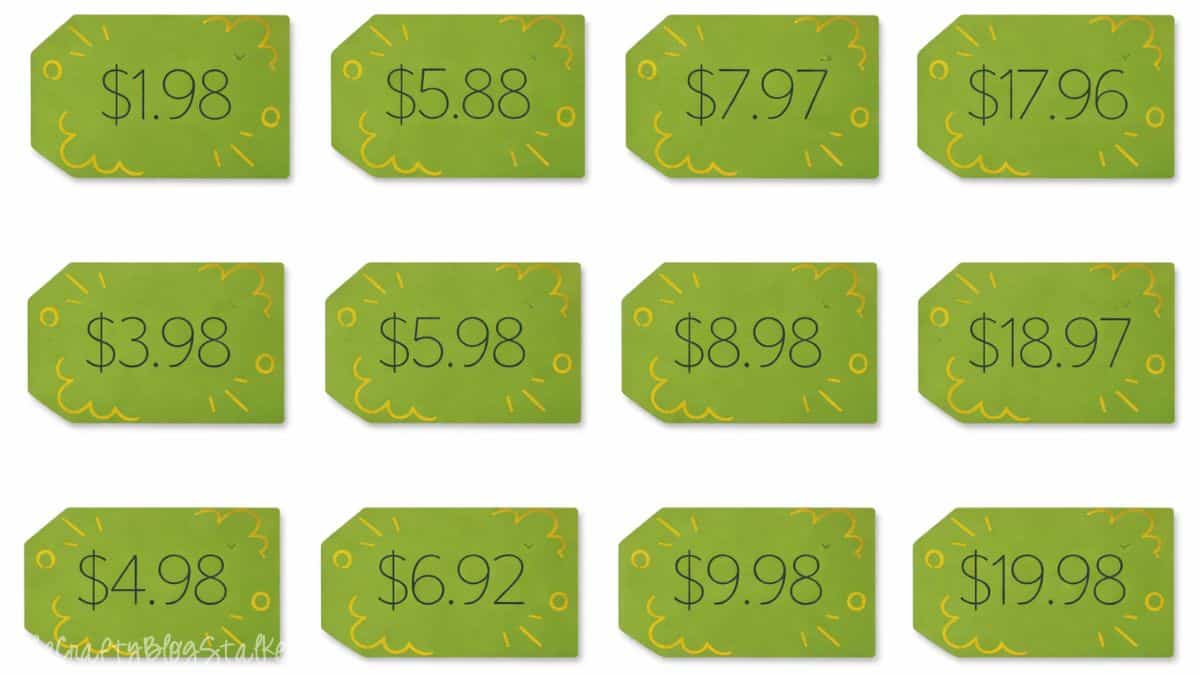
I searched for 12 baby items priced between $1.98 and $19.98. Try to avoid duplicate prices, although a few items can have very similar prices to make the game a little more challenging for guests.
Think of items like:
- pacifiers
- baby socks
- diaper cream
- baby shampoo
- small toys
- teething rings
Be sure to keep your receipt since you'll use it when creating the game cards.
Create Game Cards in Canva
You can use my Canva template to make this part super simple.

Look at your receipt and update the price amounts on the template so they match your baby items.
Each item appears in four places on the card, so make sure all four prices match.
When the card is ready:
- Click Share in the top right corner
- Select Download
- Choose PDF Print as the file type

Then print your cards and use a paper trimmer to cut them apart.
Now your game cards are ready for your baby shower guests!

Create Price Tags with Cricut
Open the Price is Right Tags in Cricut Design Space.
Click into each tag and change the prices to match your baby items.

Be sure each tag is attached so the Cricut cuts and writes correctly.
Once everything looks good:
- Click Make
- Select your material (usually medium cardstock)
- Place cardstock on a StandardGrip mat
- Load the mat into your machine
Cricut Design Space will prompt you to switch between the black and gold markers.

Once the tags are finished cutting and drawing, they are ready to place next to the baby items.

Game Play
Set up the game on a large table or counter where guests can easily see everything.
Arrange the baby items with a numbered circle next to each item. Mix up the numbers so they are not in price order.

Place a stack of cards and pens nearby so guests can write their names and make their guesses.
I placed a small basket near the display so guests could drop their cards in when finished instead of carrying them around during the party.
Later in the shower, gather everyone together and reveal the prices, starting with item 1 and ending with 12.
Guests keep track of how many prices they guessed correctly. The person with the most correct answers wins the prize.
Baby Shower Prize Ideas
For prizes, I kept things simple and fun. I used Bottle Pops from the Dollar Tree, which matched the theme perfectly.
Other fun prize ideas could include:
- candy bars or chocolate
- small gift cards
- candles
- bath products
- baby-themed treats
This baby shower game turned out to be one of everyone's favorite moments of the party, and it made celebrating our little grandbaby even more special.
More Baby Shower Ideas
Planning baby showers is a wonderful way to celebrate new life, so if you're looking for more fun baby shower games and activities, check out these ideas next!


Hi, I'm Katie!
I'm so glad you're here. Want to make something fabulous? I'm here to help!